
How it Works
Using the example data in Figures 5 or 6, here are the steps the software performs to create the order:
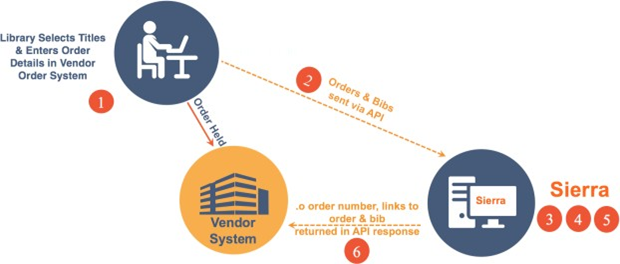
- Library selects titles and enters order details in vendor order system
- The vendor packages up the order and bib data as shown in Figures 5 & 6 and sends it to the Sierra server via the API. The order is also held in the vendor order system.
- Sierra parses the parameters data and validates that the required parameters have been provided.
- The login parameter is checked in Sierra to ensure the proper permissions are in place for that Sierra account and it determines the accounting unit associated with that login. That accounting unit is used for the purchase.
- Sierra parses the order and bib data and creates Innovative bib and order records according to the rules outlined in the load profile table on the Sierra server named m2btab.oapi. This load profile table is installed at every Sierra site and is used to customize how the order and bib data submitted through the API gets mapped to fields in Innovative order and bib records and sets the match point for detecting duplicate bibs and specifies the action to take when a duplicate bib is detected.
-
After the bib and order records have been created, a response is sent to the Acquisitions API consumer that includes an HTTP status code, control number, orderID (link to the order record), bibID (link to the bib record), and legacyOrderID (the orderID prepended with .o and a check digit appended to it).
